
Measurement
How to Audit Window Marks Across Plans, Elevations and Schedules
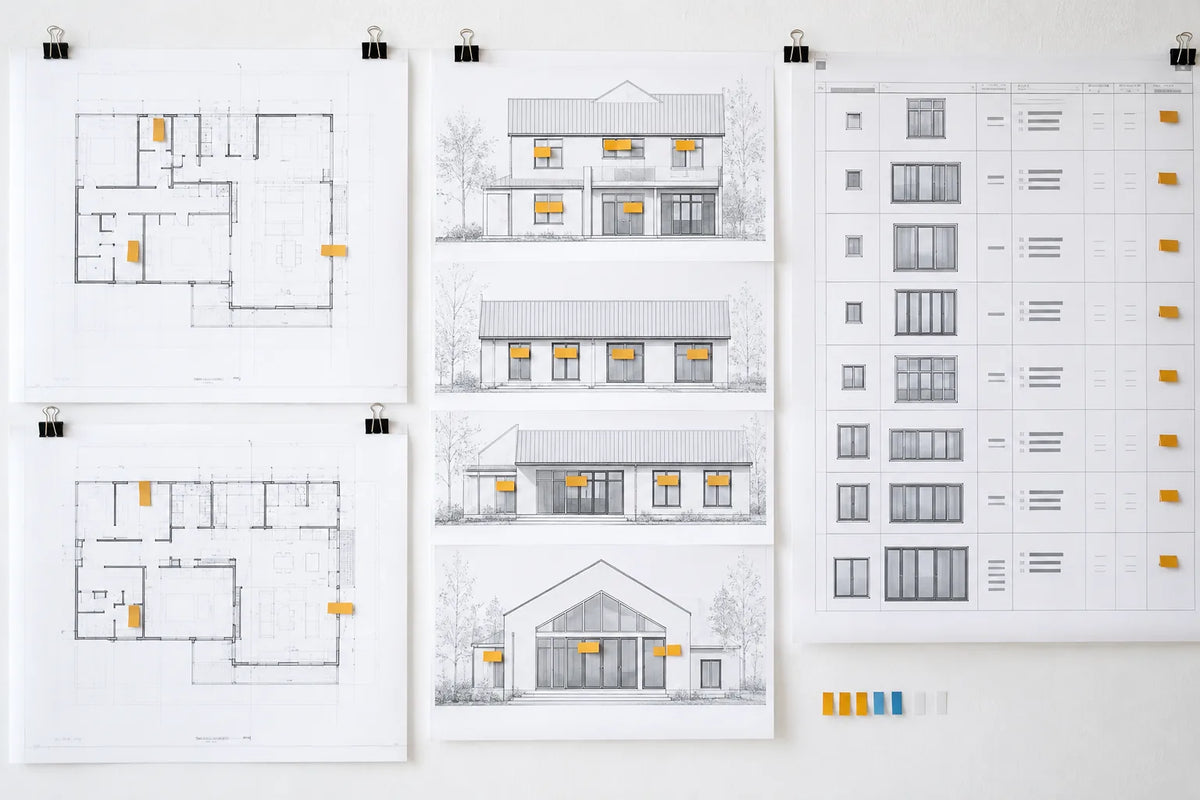
Audit window and door marks by creating one row per opening, then comparing that mark across the current plans, elevations, details and schedule. Record every mismatch in a discrepancy register with its source sheet, revision, decision owner and status. The audit identifies conflicts; it does not decide which dimension or notation is correct, replace field verification, or authorize production.
This is a pre-RFQ document-control task. It helps a builder or architect avoid sending a supplier three different versions of the same opening while preserving the project team's responsibility for final decisions.
Freeze the document set before comparing it
Start by recording the exact drawing and schedule set under review. List each file, sheet, revision and issue date. If the team compares a current elevation with a superseded schedule, the register will create noise rather than resolve it. Keep old sets available for history, but do not mix them into the active audit.
Assign one person to maintain the register. Other reviewers can raise issues, but one controlled list prevents duplicate issue numbers and inconsistent status labels.
Build one opening-mark index
Extract every window and door mark shown in the active documents. Use one row per mark. If a mark repeats, record the expected quantity and locations rather than creating an untraceable note such as “typical windows.” Include doors in the same audit when they belong to the same supplier package.
The index is not yet a quote schedule. It is a map of where each opening appears so reviewers can find conflicts before building the final supplier input.
Compare seven attributes
- Location: Does the mark appear in the same room, wall or elevation position?
- Quantity: Does the plan count agree with the elevation and schedule?
- Nominal size: Are the stated design dimensions consistent across the documents?
- Operation or type: Does the schedule describe the same functional intent shown graphically?
- Handing or direction: Where applicable, is the notation consistent and is the viewing convention defined?
- Material or finish intent: Are notes aligned, or is a selection still TBD?
- Detail reference: Does the opening point to the intended head, jamb, sill or threshold detail?
These are comparison fields, not instructions to select a product. Structural, glazing, egress, energy, installation and code decisions remain with the qualified parties responsible for the project.
Record a conflict without deciding it
Write the discrepancy as an observable difference between two sources. For example: “Mark W-12 is shown twice on elevation A but quantity one appears in schedule B.” Do not write “quantity should be two” unless the authorized project decision maker has confirmed that answer.
Reference both sources precisely. A useful entry lets another person reproduce the comparison without asking what the reviewer meant.
| Issue | Mark | Source A | Source B | Question | Owner | Status |
|---|---|---|---|---|---|---|
| DISC-001 | W-12 | Elevation / current revision | Schedule / current revision | Confirm intended quantity | TBD | Open |
| DISC-002 | D-04 | Plan note | Door schedule | Confirm operation notation | TBD | Open |
Assign the decision owner and response needed
The register should name the party expected to answer, subject to the project's contracts and professional roles. The architect may clarify design intent; the builder may confirm package or sequencing information; the qualified local team may verify site conditions. The supplier can identify missing quotation inputs but should not be forced to invent project requirements.
Define the response needed: revised drawing, revised schedule, written clarification, field verification or TBD carried into pricing. An owner without a required response does not close the issue.
Use consistent discrepancy types
Classify each issue so the team can sort the register instead of rereading every description. A location conflict means the same mark appears in different positions. A quantity conflict means the count differs between sources. A dimensional conflict records inconsistent stated design information without selecting the answer. Operation, handing, finish and detail-reference conflicts should be kept separate because they normally require different reviewers.
A missing reference is also a discrepancy. If an elevation shows an opening but no schedule row exists, record the missing row rather than inventing a new mark. If the schedule lists a mark that cannot be located on the current drawings, record the location question. This approach makes omissions visible before suppliers build their own assumptions into pricing.
Define what “closed” means
An issue is closed only when the authorized response is documented and the active source set reflects that answer. “Discussed,” “sent to architect” and “supplier aware” are progress notes, not closed states. If the team intentionally carries an unknown into pricing, set the status to TBD for quotation and tell bidders how to identify their assumption. That keeps an unresolved design decision visible without blocking early budget work.
Reconcile the answer into the controlled schedule
When an authorized answer arrives, record the response reference and update the controlled source document. Do not close a register row merely because someone replied by email. Confirm which schedule or drawing was revised, by whom and on what date.
Then prepare the quote-ready window and door schedule. If final site information is required, coordinate it separately using qualified local verification; the rough-opening guide explains why preliminary and verified information must remain distinct.
Copyable discrepancy register
| Field | What to record |
|---|---|
| Issue ID | Unique tracking number |
| Opening mark / category | Window or door identifier |
| Source A / Source B | Sheet, revision and observed value |
| Discrepancy type | Location, quantity, size, operation, handing, finish or detail |
| Decision question | The exact clarification required |
| Owner / status | Responsible party and open-review-closed state |
| Response reference | RFI, revision, meeting record or verified source |
| Controlled document updated | File, revision, person and date |
| RFQ impact | Revise before issue or carry as TBD |
Pre-RFQ closure check
- Every active opening mark appears in the index.
- Every conflict cites two current sources.
- No reviewer has guessed the correct value.
- Every open item has an owner and required response.
- Closed answers have been incorporated into a controlled document.
- Remaining unknowns are visibly labeled TBD in the RFQ.
Later, supplier drawings require a separate review and approval process. Use the shop-drawing review checklist when the package reaches that stage.
Turn the reconciled set into a project quotation
Meruzy can review current plans and schedules, coordinate proposed product dimensions and drawings, and prepare a free project quotation. Proposed drawings and revisions are free, and there is no minimum project amount. The local project team must verify site conditions and approve final production information.
Editorial review
Prepared for project education and reviewed for consistency with MERUZY’s current supply-only design, quotation and delivery process. Project-specific requirements are governed by approved documents and the formal order.
Reviewed by: MERUZY Project Coordination Team
Sources and further reading
QUESTIONS & DISCUSSION
Ask a question or add to the discussion
Have a question about this guide? Ask it here. The MERUZY team and other project professionals may respond.
Do not include private project information, addresses, drawings, pricing, order details, phone numbers or email addresses in your public comment.
Have a project to review?
Share your plans, rough dimensions, or schedules for a comprehensive DDP estimate and technical review.